JD Edwards Date Conversions (CYYDDD)
Thursday, April 16th, 2009
In the last post, we talked about Julian dates and Unix Timestamp conversion. We recently received a support request regarding another type of date conversion and, since it might be applicable to others, we thought it would be a good idea to show how you can convert it in Strata. The format is C-YY-DDD, which is used by JD Edwards software: the century after 1900, the year in that century and the Julian date within that year. Here are a few examples:
105031 - January 31, 2005
107263 - September 20, 2007
98129 - May 9, 1998
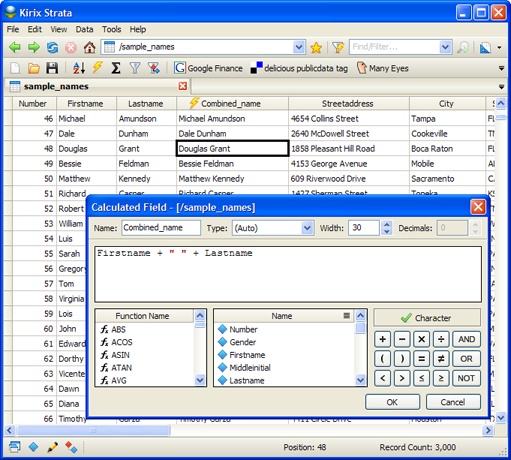
To convert the dates we first want to get the string into the proper year and then we'll add the Julian date to get the proper day/month (which will also take into account leap years). So, let's take the example “107263″ (we'll assume that it is in Numeric format in your field). Here is the full expression you can use in a calculated field:
date(1900+(field1/1000),1,1)+val(right(str(field1),3))-1
Getting the Year
date(1900+(field/1000),1,1)
The first part of the formula takes the string and divides by 1000, which, when rounded, will provide the first three digits (”107). It then adds 1900 to the 107 to give us “2007″. Then the normal date conversion applies and we end up with “01/01/2007.”
Getting the Day and Month
val(right(str(field1),3))-1
Here we are adding the Julian days for the year to the date we created above “01/01/2007″ — so, if we added “1″ to this date, we would get 01/02/2007, and so on. Here we are using the RIGHT() function to pull out the 3 digits on the right side of the field, in this case “263.” Because it was numeric, we needed to first convert it to a string using the STR() function and then we converted the result back to a numeric value using the VAL() function. This gives us “09/21/2007.” Because we started at “1″ (January 1st) instead of “0″, we simply need to subtract 1 from our date to obtain the correct date of “09/20/2007.”
NOTE: If your JDE date was a character field instead of a numeric field to begin with, you could change the structure or just convert manually in your expression with the VAL() function as follows:
date(1900+(val(field3)/1000),1,1)+val(right(str(val(field3)),3))-1
If anyone has other date conversions they're having trouble with, please let us know and we'll see if we can help.

 Calculated fields are one of the cornerstones of data analysis. It's just one of those tools that you end up using again and again. And, if you can master the functions and formulas and make them do your bidding, you'll be well on your way to becoming a data
 We had
  It's been