

Benford's Law and Fraud Detection Analysis

by Jeff Engel | 

The Benford's Law and Fraud Detection Analysis enables you to graph a data set against a Benford's law curve to find abnormalities within the data. This enables you to quickly ascertain the accuracy of the data, which is particularly helpful for detecting fraud in various business data such as check payment amounts. For further information, you can see a video of this extension here.
Overview
Benford's law, sometimes called the first-digit law, states that the first digit in many types of data sets are distributed in a non-uniform way. In fact, this law says that the number 1 will appear as the first digit about 30% of the time and the number 2 will appear as the first digit about 18% of the time, whereas the number 9 will only appear first about 5% of the time. This law applies to a wide variety of data sets, such as stock prices, street addresses, census data, lengths of rivers, etc.
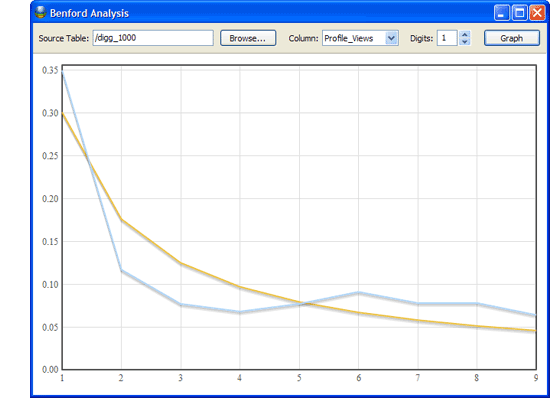
Benford's law also has applications within fraud detection. Those who commit fraud may create fake payment amounts that “look” real. However, unless the perpetrator knows of the Benford's law distribution, the made-up numbers will not follow the proper curve, making the potential fraud easy to spot when the curves are shown together. A Benford's law test may also notice user-manipulated, though not fraudulent, data. For instance, there may be an unexpected number of $24 payments because employees are trying to avoid the bother of supervisor sign-offs for expenses of $25 or more.
Benford's law will apply to almost any natural data set (e.g., payment amounts), but not to a limited-by-definition category (e.g., payment amounts between $50 and $100) or to predetermined data sets (e.g., customer number or social security number).
Instructions
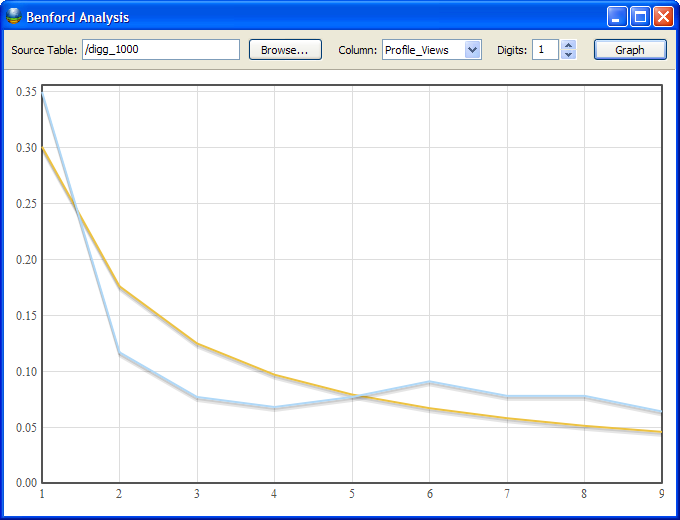
- After installing the extension, select “Benford Analysis” from the Tools menu to open up the tool. A line graph will appear that shows the typical Benford's Law distribution curve in yellow.
- Source Table. Click on the Browse button to view your project and select the table you wish to analyze.
- Column. Once a table has been selected, choose a column name from the drop-down menu. The data in this column will be analyzed to determine the first-digit distribution.
- Digits. By default, this extension will only analyze the first digit of the number. However, if you would like better resolution, you may increase the number of digits to analyze. For instance, if you select 2 digits, the numbers will be analyzed from 10 to 99, instead of 1 to 9 for single-digit analysis.
- Graph. When you have selected each of your parameters, simply click the Graph button and your graph will be processed. The results of your data will show up as a blue line graph next to the yellow Benford's law distribution.
Further information along with a video showing the extension in action can be found here.
Update 07/21/2008: Fixed a bug in the graph when 2-digits or more were analyzed.
Update 07/31/2008: Fixed a bug with spaces in table names; note that this version requires an upgrade to 4.1.1 or higher to run.
Update 11/20/2008: Fixed a bug with international number formatting.
Update 12/17/2008: Added functionality to work with numbers in a character field, changed dialog dimensions and color.
Version 1.1.772; Dec 17, 2008

July 22nd, 2008 at 1:39 pm
[…] law in action with data sets from the web. If you'd like to play with it yourself, just install the Benford's Law extension for Kirix Strata and have […]
July 29th, 2008 at 3:36 pm
I keep getting a runtime error whenever I try to use the Benford Analysis.
Script Runtime Error
Term ‘result.next' does not evaluate to a function
What am I doing wrong?
July 29th, 2008 at 4:26 pm
This looks like an excel extension but the downloaded file has a .kxt extension. What is the native program?
July 29th, 2008 at 4:29 pm
Hi Martyn,
We've run into this before and the problem was related to spaces in either a table name. So, try this — if your table is called “my table”, rename it to “mytable”. You can do this by just right-clicking the table name in the project panel (ctrl+b) and selecting “Rename”.
Also, it looks like you may have to restart strata and re-run the benford's analysis. After you get that syntax error, it appears not to want to re-run. We'll have to fix this for the next version of the extension.
Lemme know if that does the trick.
Thanks!
ken
July 29th, 2008 at 4:35 pm
Hi Steve, thanks for writing in.
The Benford's Law Plug-in is for Kirix Strata, not Excel. The .kxt file is the naming extension for Kirix Strata plug-ins — it is used to package the javascript together to make the plug-ins easy to install.
You can download a copy of Strata here: https://www.kirix.com/download.html
To install the extension, you can just open up Strata, navigate to this web page and click the “Install Now” button.
July 31st, 2008 at 9:03 am
Thanks Ken, it works perfectly now.
July 31st, 2008 at 8:38 pm
[…] In addition, please note that if you are using the Benford's Analysis extension we mentioned in the previous post, it too has been upgraded to deal with a pesky field naming bug. It is backwards compatible with 4.1, but the old extension will not work with 4.1.1. You can install the upgraded extension from here. […]
August 4th, 2008 at 3:14 pm
where did you get fraud dataset for the video?
August 4th, 2008 at 3:46 pm
Hi Irene,
It wasn't available as a table, so I ended up having to input it manually. The source material is from the following article (definitely worth a read if you're interested in Benford's and fraud): http://www.aicpa.org/pubs/jofa/may1999/nigrini.htm
January 26th, 2009 at 5:25 pm
Great tool, but I do have a major problem.
After importing a table, saving it and opening the benford tool there is no line graph showing the typical Benford's Law distribution curve. After a klick on graph nothing happens…
Have I made something wrong?
Thanks!
Mike
January 26th, 2009 at 5:36 pm
Hi Mike,
Sorry about that. We've had this problem in the past and I thought it was fixed, but I guess we'll have to have another look…
My guess is that you are experiencing is due to a language encoding issue with this extension. As a workaround, if you change your regional settings in Windows to “English (United States)”, the Benford's module should work as expected.
Can you let me know what the native language for your system is and we'll have a look and see if we can replicate the problem here. Thanks very much!
January 26th, 2009 at 6:08 pm
Hi Ken!
That was one quick reply, thanks!
The change of my regional settings did it. My native language setting is German.
Again, thank you for that quick solution. Hope you can fix the language encoding problem.
Take care
mike
January 26th, 2009 at 6:16 pm
Happy to help!
February 11th, 2009 at 10:19 am
So when try to open the extension after it is downloaded, the computer says that it cannot open because it doesn't know who made the program. Is there anyway to fix this?
February 11th, 2009 at 11:00 am
Hi Molly,
The Benford extension is a plug in for the Kirix Strata analysis tool (https://www.kirix.com/strata/download). Once you install Strata, go to Tools > Extensions and you can click the “Add Extension” button to install the Benford plug-in. If you're still running into problems, please let me know.
September 17th, 2009 at 12:26 pm
I'm installing Kirix Strata now and plan to use the Benford extension. I just wanted to say that based on what I see here, your customer service is excellent. Keep up the good work!
Anthony K.
September 17th, 2009 at 1:42 pm
Happy to help. if you need any help with Strata, just shoot us a note on our support forums: https://www.kirix.com/forums/
February 25th, 2012 at 3:30 pm
The extension says that the table columns or rows contain too many spaces so it won't work, even though I'm sure there is not a problem with it
January 6th, 2014 at 5:14 pm
Hi,
I downloaded kirix and add Benford extension accordingly,
BUT, program stops to work when i select Tools/Benford Analysis.
I am running Kirix Strata for 64-bit Windows on my Wind& 64-bit system.
Does anyone else face this issue? what is the solution?
Karlo