Data and the Web

Archive for the ‘news/announcements’ Category

Join us at TECH cocktail Chicago, Thursday May 29th

Wednesday, May 28th, 2008

Tech cocktail logIf you live in or around Chicago, feel free to stop by TECH cocktail Chicago tomorrow (May 29, 2008 from 6:30PM - 9 PM) and say “Hello.” The TECH cocktail folks do it up right, so you’re bound to have a good time.

We’ll be giving demonstrations all night, which, ahem, should get better and better as the night goes on. :)

You can register here. Since John Barleycorn’s is kitty-corner from Wrigley Field, I’d highly recommend taking public transport tomorrow lest you run into Cubs traffic.

See you tomorrow!

Free Web Seminars - “Building the Mashable Enterprise”

Wednesday, May 28th, 2008

Just wanted to let everyone know that SnapLogic will be offering a series of free web seminars about Mashups in the Enterprise over the course of June and July. All seminars are free and open to the public.

Aaron Williams, one of our data gurus here, will be kicking off the first seminar with a demonstration of Kirix Strata™ on June 4th:

Data Visualization and Spreadsheets on Steroids
Guest presenter: Aaron Williams, Chief Scientist, Kirix
Wednesday, June 4, 2008
10:00 a.m. PDT/1:00 p.m. EDT
Register here

Here’s the rest of the lineup:

Building a Data Service with a Parameterized Query
Guest presenter: Mike Pittaro, Chief Community Officer, SnapLogic
Wednesday, June 11, 2008
10:00 a.m. PDT/1:00 p.m. EDT

Bringing Web 2.0 into the Enterprise with Mashups: Drivers, Requirements, and Benefits
Guest presenter: Dion Hinchcliffe, Principal, Hinchcliffe and Company
Wednesday, June 18, 2008
10:00 a.m. PDT/1:00 p.m. EDT

Enterprise Mashups and Rich Internet Applications
Guest presenter: Michael Coté, Analyst, RedMonk
Wednesday, July 9, 2008
10:00 a.m. PDT/1:00 p.m. EDT

Creating Enterprise Mashups with WaveMaker Ajax Studio and SnapLogic
Guest presenter: Craig Conover, Software Developer, WaveMaker
Wednesday, July 16, 2008
10:00 a.m. PDT/1:00 p.m. EDT

Mashing SaaS Applications and In-House Enterprise Data Sources
Guest presenter: Mike Pittaro, Chief Community Officer, SnapLogic
Wednesday, July 30, 2008
10:00 a.m. PDT/1:00 p.m. EDT

Full details and registration links can be found here.

Hope you can join us on the 4th!

Update from the Web 2.0 Expo

Friday, April 25th, 2008

Well, it’s the last day of Web 2.0 Expo. If this turns out like the the first two days of the expo, it should be another great day of continuous conversations and demos.

Web 2.0 Expo is certainly a much larger show than the MySQL conference. There’s simply an enormous number of people here, so the dynamic is quite a bit different. When we were at the MySQL show, it felt like hanging out with a close group of friends; at Web 2.0 Expo, it’s more like being at a rock festival.
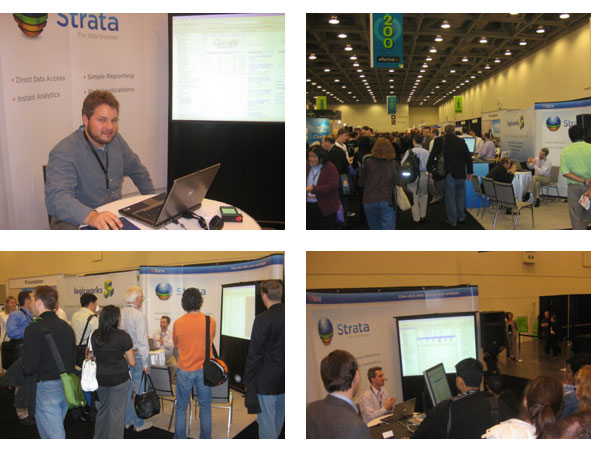
Photos from Web 2.0

Although the scale is different, one constant is the amazing new technology that’s on display. One of the eye-catching tools that we’ve enjoyed seeing at both shows is MindTouch’s Deki Wiki. This is basically a next generation Wiki platform that really expands the idea of what a Wiki can be. For instance, it has both an API and the ability to host structured data. This is exciting for us, since it opens up the possibility of creating a “Data Wiki”– a platform for publishing and editing data in a collaborative way. Maybe the idea of a “Wikipedia for data” is not too far away after all.

Overall, it’s certainly fun to be in the middle of all this. At just about every moment we’ve had a lots of people gathered around our booth and it’s been really great to be able to demo Kirix Strata™ in person. I’m sure I’ll probably be beat by the time I get home, but at the moment, I’m just fired up just to be here. Now, if I had only brought that extra box of business cards along… :)

A Postcard from the MySQL Conference…

Thursday, April 17th, 2008

Just finished up showing Kirix Strata™ off at the MySQL Conference and Expo in Santa Clara, CA the past couple days.

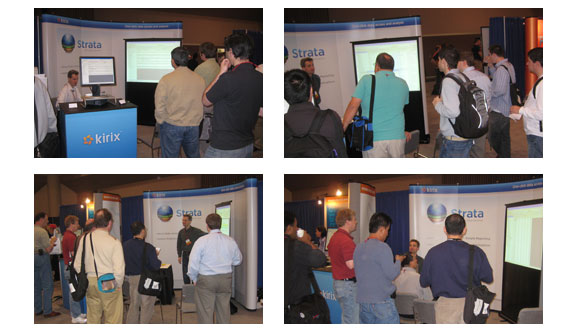
Photos from the MySQL Conference

We had some great crowds, excellent questions and plenty of discussion about how Strata can fit in to a MySQL shop. Besides the hands-on data analysis and querying Strata allows, people seem pretty impressed with how quick and easy it was to generate ad hoc reports.

We also had the chance to meet a lot of great people from various companies — definitely some pretty cool technology out there. One company in particular that we were impressed with was SnapLogic. They’re sort of like Yahoo Pipes for the Enterprise — they make data integration really simple. We even had the chance to hook Strata up to some of their data feeds… it was like a match made in heaven.

Well, nothing like doing demos all day for two days in row. We’ll try to match that and then some at the Web 2.0 Expo next week from April 23rd through the 25th. If you’ll be attending, please make sure to drop by and say “hi”.

Beta No More: Say Hello to Kirix Strata…

Wednesday, April 16th, 2008

We’re pleased to announce that Kirix Strata™ is now officially out of beta! A lot of hard work and late nights of coding have been put into this li’l tool and we hope it makes people’s lives a little bit easier when it comes to data analysis.

Image - New Strata Logo

Thanks to everyone who has been involved in the beta process — we’ll get those free licenses rolled out to you within the week.

Also, you’ll notice a big ol’ website redesign too. We want to give a special shout out to Jeff, Benni, Peter and David for the bang up job they did with the design and implementation of the website.  And, here’s our new overview video, check it out:

Play Video

(And here’s an embeddable YouTube version…)

Now that Strata is out, we’re looking forward to adding a lot more content to the site, in terms of more data-centric blog posts, product applications, tips & tricks as well as some open-source projects that we’ve been working on in the background. Oh yes, we also have a load of extensions that we are planning to release too. So much to do, so little time. :)

Thanks again to everyone. Please download the full version of Strata and try it out for 30 days free. If you have any questions, feel free to post a message to the forums or shoot us an email.

Kirix Strata: Announcing Release Candidate 1

Friday, April 4th, 2008

After a long, long beta cycle, we’re pleased to finally announce a release candidate! Feel free to download it here.

This version takes Beta 9, released last week, and tightens the screws. We’ve done a lot of bug fixes and added plenty of little things here and there, like cleaning up some GUI items and making our nomenclature consistent. Oh yes — exciting things like determining if a menu item should be “Bookmark Location” or “Bookmark This Location” or if a dialog should be called “New Bookmark” or “Add Bookmark”. Yes, I can tell you’re extremely enthused. :)
We’ve also tightened up the report writer functionality — the grouping wasn’t working very well in Beta 9, but in this version, you can have multiple groups in your report. Also, we added the ability to create reports directly from queries instead of just tables. And, try out Quick Report: highlight a few columns in a table then select New > Report and see what happens.

And, drumroll please…

We finally have a help manual. It is a not-yet-final-draft, so please excuse any grammatical errors. It’ll give you all kinds of extra information about doing data analysis using Strata that you probably didn’t know existed. Select Help Contents from the Help menu and have a look.

We expect a second release candidate by mid-next week that should have everything tightened down even further… so stay tuned for more good stuff to come.

Please keep the feedback coming, it’s really appreciated! Thanks!

Kirix Strata Beta 9 Available

Thursday, March 27th, 2008

We’re happy to announce that Strata beta 9 is now available for download. This build includes tons of bug fixes and really tightens down the interface. Here are some of the more significant items in this release:
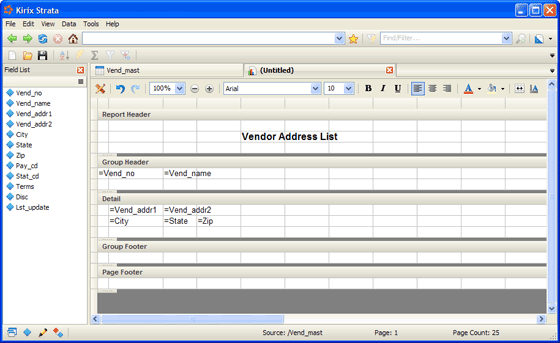
Screenshot - Report Writer

Formatting

We’ve had a long, winding history in trying to clearly present formatting options to a user. Formatting is mainly used in report creation, but it can also be used in a table view, for such things as coloring columns. Bottom line, there were lots of different options on the table.

In the end, we think we came up with a pretty good solution. By default, the formatting toolbar is now embedded in the report writer document view. This makes it really easy to do formatting in a report but also tucks away the formatting while using other parts of the package.

However, we really didn’t want to limit the formatting to only reports, so we have an option in the View menu to show the Format Toolbar. If you turn this on, the Format toolbar will appear underneath the Boomkark Toolbar and will no longer appear in the report writer. It boils down to a toggle: either always show the format toolbar or only show it when creating reports.

So far in our testing, it seems to be working out well.

User Interface

There are lots of very small items here. We’ve tried to tighten down the UI as much as possible with this beta. We’ve updated some icons, worked on a consistent nomenclature in menus and dialogs and did the work on the formatting toolbar mentioned above. There may be some other small changes here and there, but this should be pretty close to what the interface will look like when we officially release.

Report Writer

There’s been some really great development on the report writer front. We’ve got a new grouping/settings panel, which should make it easier to quickly define your page layout and groups. Also, many bugs are getting squashed.

However, the big feature to fall in this version is Save to PDF. You can now create a report and go to File > Save As External to save the report to a PDF file for archiving or sharing. It is never easy to get things working with external format types, but we’re delighted to see this available.

There are still a bunch of bugs in report writer that will be sorted out very soon; we appreciate your patience.

Options/Preferences

Our Options/Preferences area (Tools > Options) has gotten a big overhaul. We now have settings for popup blocking, cookie management as well as script and report preferences. There are still a few things yet to be hooked up (the Privacy tab in particular), but these will be coming online very soon.

Scripting: DOM Bindings!

We’ve now got DOM bindings in our scripting, which will let you programmatically interact with the web control in the scripting language and let you design forms and controls that use web widgets.

We’re been craving these bindings since we originally incorporated the web browser into Strata, as it really provides a ton of power to manipulate the web and build extensions.

Stay tuned over the next month for extensions and script examples that utilize these new bindings. We’re looking forward to see what ideas everyone can come up with too.

Thanks for all the feedback; it is very helpful. Please keep it coming!

Stop By and Say “Hello”

Tuesday, March 25th, 2008

Boy, time sure flies when you are trying to finish a beta cycle…

I just wanted to give everyone a heads-up that Kirix will be showcasing Kirix Strata™ at two big tech conferences during the month of April:


MySQL Conference & Expo 2008

MySQL Conference & Expo
April 14-17, 2008
Santa Clara, California
Booth #212


Web 2.0 Expo San Francisco 2008

Web 2.0 Expo
April 22-25, 2008
San Francisco, California
Booth #244

If you happen to be attending either conference, please stop by and say hello. We’d love to meet you and chat about, well, pretty much anything. Our guys are known to provide completely off-road software demos too… so don’t shy away from bringing along any crazy ideas.

:)

See you then!

Kirix Strata Beta 8: We’re Getting Closer…

Friday, February 22nd, 2008

Hello everyone,

We’re happy to announce that Kirix Strata Beta 8 is now available for download!

Screenshot - 2008 Cubs Schedule

There’s been lots of good work on Strata over the past month or so, with much of it focused on bug fixes and other tweaks for a better overall user experience. That said, here are a list of some of the bigger things we’ve tackled for Beta 8:

Data Conversion

We continue to try and make opening, saving, connecting to and integrating data as seamless as possible. We’ve taken another good step in this direction by enabling “Save As” to work between external database systems and external folders. So, for example, now you can do things like connect to a MySQL database and drag a table from there into an Oracle database system. This basically lets you copy tables from one system (or local folder) to another. And, of course, you can also do this same type of copying operation with data files already saved to your Strata project.

User Interface Enhancements

  • We’ve done a lot more work on the Bookmarks toolbar. We’re also delighted to finally have favicons in, which makes things feel slightly more “normal” when browsing and using bookmarks.
  • The Project Manager has been given a very nice face lift and is far more usable than it was in Beta 7.

Report Writer

We’ve optimized the layout engine so that reports created with large data sets are now generated SIGNIFICANTLY faster.

Scripting

We’ve added the following functionality:

  • Support for FTP and SFTP to push data back and forth. We’re working on some example extensions that will make great use of this functionality.
  • A new, improved ListView control.
  • A HostPreferences class for storing and retrieving application and extension preferences.
  • A HostApp.createPane() and HostApp.createDocument() so that forms can be added to the application as docked panels or documents.

As always, please take the new version for a spin and let us know what you think. Bug reports and all other feedback are more than welcome. Thanks!

Kirix Strata Beta 7: Quick Filter, Data Link Refresh and Report Writer

Monday, January 7th, 2008

(NOTE: See screencast video below for a quick look at some of the new features!)

Hope everyone had a lovely holiday season!

We’re happy to report that our developers provided lots of shiny new toys in our Strata stocking over this past month, including further work on Data Links, the inclusion of a “Quick Filter” mechanism and the introduction of our new report writer. Please feel free to download Strata Beta 7 and let us know what you think!

Here’s more information on what’s new in this latest version:

Data Links

The ability to bookmark data files is coming into its own. We’ve got things working pretty well on CSV and RSS files at the moment, with some more work still to do on HTML tables. Here’s a general synopsis:

  1. Open a CSV or RSS table from the web.
  2. Perform your own analysis, using calculated fields or marks.
  3. Save the data URL as a simple bookmark.
  4. Click the Refresh icon or open up the bookmark in the future. Your data (and your calculations) will refresh based upon the new or updated data on the server.

We’ve been finding this quite useful internally, particularly in relation to analyzing our web log data. Check out the screencast below for further info.

Report Writer

With Beta 7, we are also introducing our new report writer.

You can create your report in a design view (similar to a template) and then toggle to a layout view for a preview of what you’ll see when you print. As a bonus, the layout view enables you to manipulate and format your data directly, instead of being bound to a “print preview” mode.

Another cool thing is that, besides creating reports from data in your project, you can also create reports directly from external data, such as local CSVs or MySQL tables. (First go to File > Create Connection, then you can select it as your source data in the report writer). Check out the screencast below for a quick demo of the report writer in action.

Please note that there are a few known bugs with Report Writer in Beta 7. These include:

  • When using groups, the first group does not display properly.
  • The layout view can be extremely slow when using large files. Now that we’ve got some big features in, optimizations will soon follow.
  • Items in the Report Header in the design view do not display properly on the top of the page.

Other Enhancements

Here are some of the other improvements that have been implemented:

  • Quick filter allows tables to be filtered really easily (see screencast below for a quick demonstration).
  • Quick import for MS Access and Kirix Package file via the File > Open command instead of File > Import.
  • Support for CSV files with Unicode character sets.
  • CSV auto-sensing determines the field delimiter so lots of different delimited files are parsed and opened automatically (e.g. comma, tab, semi-colon, colon, pipe, tilde).
  • A bunch of scripting additions, including functions to access a database table list and table structure information. We’ve also added functions to encrypt/decrypt strings.
  • Automatic plugin detection (Strata now doesn’t need to reinstall programs like Flash plug-ins if you have already downloaded them for other browsers).
  • Streamlined extension installation and uninstallation.
  • A new “loading” icon that appears on tabs while web pages are being downloaded.

Please check out this screencast, which provides an overview of Data Links, Quick Filter and Report Writer:
Play Video

(And here’s an embeddable YouTube version…)

NOTE: For those interested, here is the Yahoo URL used in this screencast. Check out Gummy Stuff’s extremely useful Yahoo Stock Ticker CSV API site for further information.

Thanks for downloading it and giving it a spin. Please let us know if you run into any bugs or need help with anything!

About

Data and the Web is a blog by Kirix about accessing and working with data, wherever it is located. We have a particular fondness for data usability, ad hoc analysis, mashups, web APIs and, of course, playing around with our data browser.